Annual Reviews

We are new to CAS360.
Previously, when I sent an Annual Review, I would then go to Clicksend and send a template message to the mobile alerting them to the document having been sent. Is there a way to automate this process in CAS360, or can I set up templates to use for SMS for this purpose? Also, is it possible for clients to sign via a link in an SMS?
-
Official comment

Hi Vivienne,
Welcome to CAS 360, and thank you for creating a community post!
At this stage, there isn’t a way to automatically send an SMS when processing the Annual Review.
However, you can work around this by creating a custom SMS template via the SMS Template screen. We recommend setting this up as a Document Deadline Reminder.
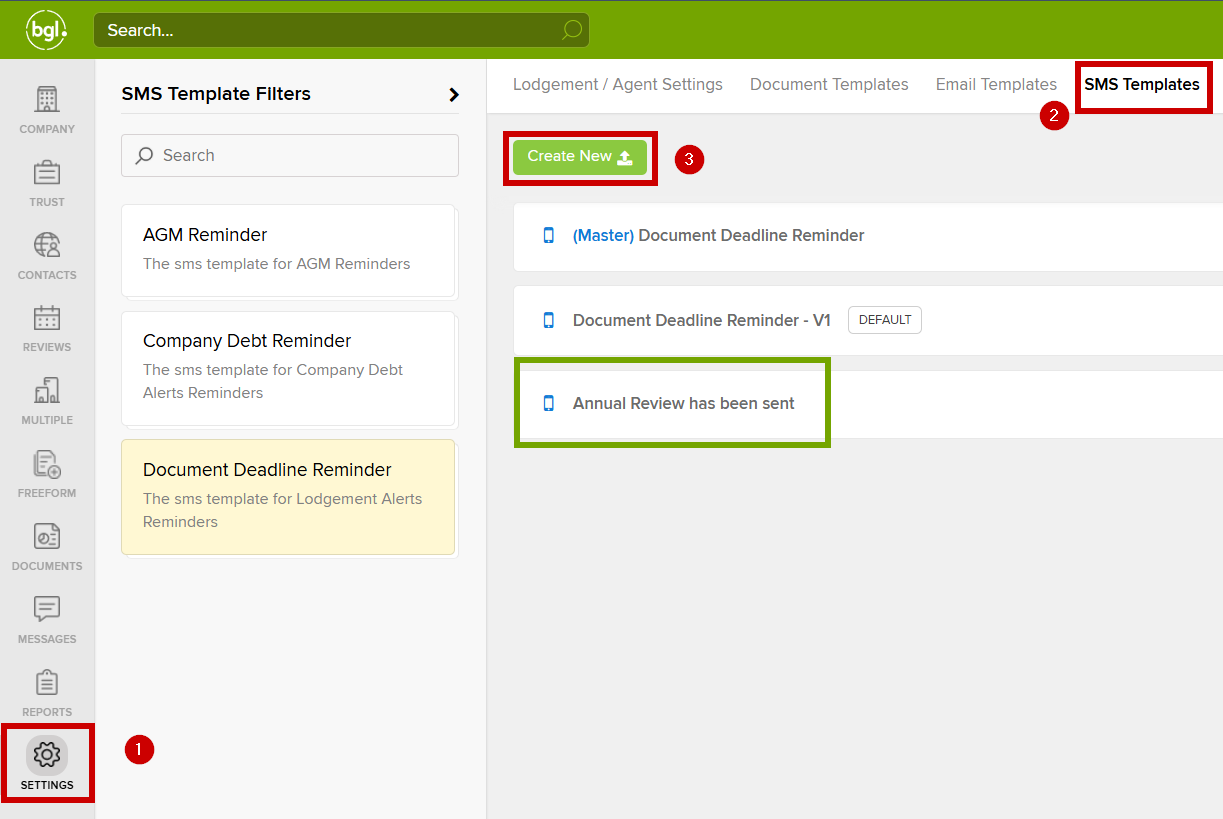
When creating your template, make sure the title is clear and specific, this will make it easier to select the correct one when sending messages.
You can also personalise your template using SMS Template Codes, which allow you to include company-specific or contact-specific details.
To answer your question,yes clients can sign via a link in an SMS.
We provide a specific SMS Template Code: ${documentLink}. When this code is included in your message, it generates a link to the document.
If digital signing is enabled for that document, the client can simply click the link and sign it electronically from their device. Please note that you will need to add this code when creating the SMS Template.
Let me know if you have any further questions or concerns.
Please sign in to leave a comment.
Comments
1 comment