Client Copies to Retain

Hello,
We've introduced esign with our annual review process and I can't see a way the client can download a copy of the documents for their records...can some one assist? Alternatively, is there an option in the email template to attach PDF's?
Many thanks :-)
-

Hi Laura,
Great question!
There is an option to email clients a copy of the completed signed document pack, but it needs to be toggled at the time of document preparation.
When you're in the Document Production screen, under Electronic Signing Options, make sure to toggle on:
“Email signers completed signed document pack?”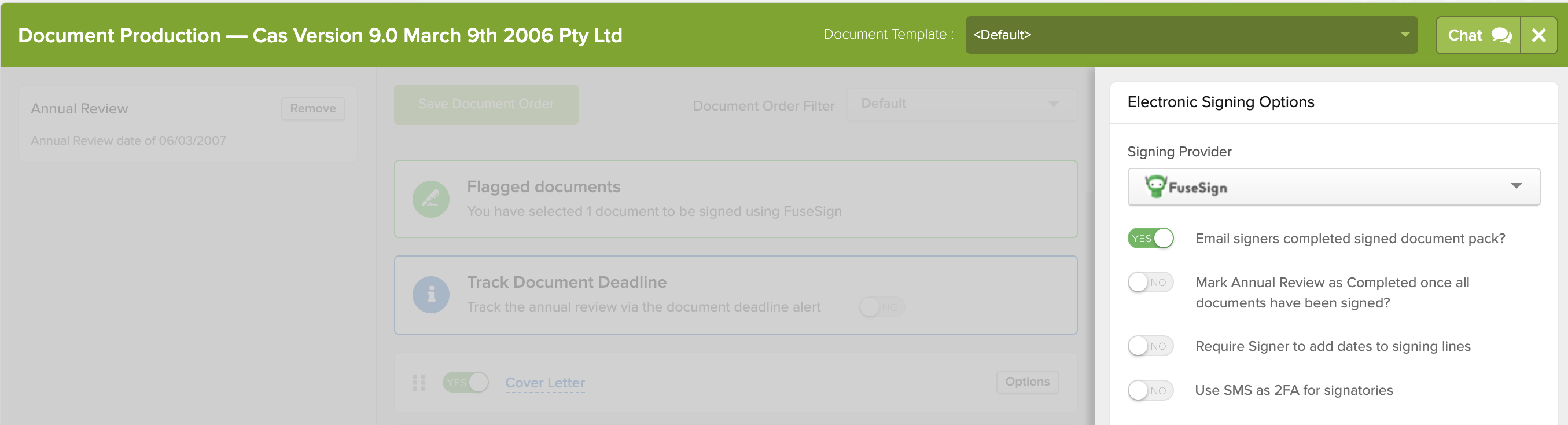
Once enabled, this will automatically email the client a copy of the signed documents once all parties have signed. This email also appears in Messages > Outbox, so you can confirm it was sent — and even resend it later if needed.
A few extra tips:
-
The setting remembers your preference, so once it’s turned on and a set of documents has been sent, it stays on for future documents until someone manually turns it off.
-
If this option wasn’t selected during preparation, you can manually download the signed documents from CAS 360 and email them to your client outside the platform. (Although there’s currently no option to send the signed pack after the fact from within CAS 360, I’ve passed your feedback on to the product team.) The signed copy of the documents can be found from the Documents screen
- If you need help uploading documents to the Document Production screen, this guide may help:
How do I attach/upload documents when sending out forms?
Hope that helps,
Norman
1 -
Please sign in to leave a comment.
Comments
1 comment