How to restore Billpay option after marking as read

I paid for our annual reviews through the Billpay link, and having assumed it worked I marked the debt as paid in the Company screen. The receipt never arrived from AusPost so I want to try paying again. Is there a way to bring back the debt alert?
-
Official comment

Hello Janice,
Thank you for getting in touch,To bring back the debt alert, navigate to the Company Selection screen, then hover over the debt alert icon.
This will bring up a table where you can refresh the debt balance, selecting the refresh icon will lodge an RA63 (Form RA63 - Request Debtors Ledger Report for a Specified Company) automatically, this will provide a debt balance for this company as according to ASIC.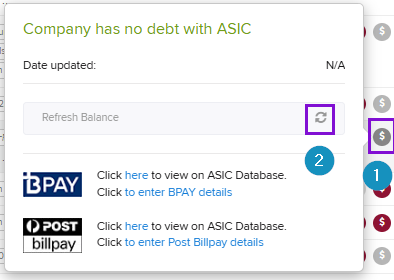

Regarding your concern, as the payment is outside CAS 360 we won't be able to confirm if the payment has been made. If you're unsure whether the payment went through, you'll have to contact ASIC directly.
Please let me know how you go with this
Please sign in to leave a comment.
Comments
1 comment